SSH client for macOS
You decide whatagents can touch.
TermCraft is a native SSH client with a built-in MCP server. Claude Code, Cursor or Codex can run commands on your hosts, and you set for each host what they may do.
How agent access works
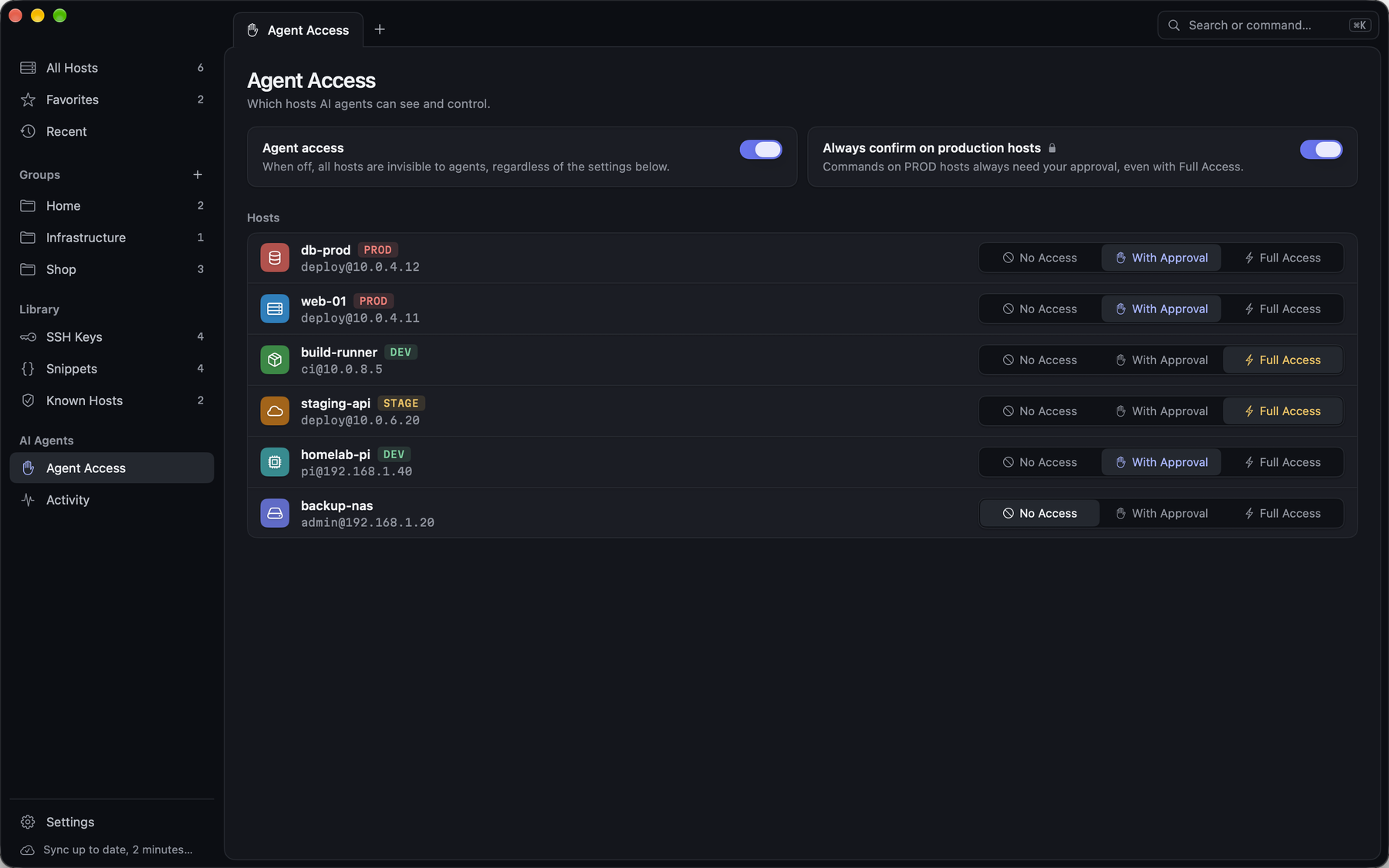
Set access per host
No Access, With Approval or Full Access. Hosts you add start with No Access, and the MCP server stays off until you turn it on.
The agent asks in your terminal
The request appears in the session of that host with the exact command and the agent’s reason. Run it, decline it, or allow that agent for 10 minutes.
Production waits for your fingerprint
Commands on production hosts and destructive commands like rm -rf or DROP TABLE always need your approval with Touch ID, even with full access.
What else you get
Agents never see secrets
Passwords, private keys and passphrases stay in the Keychain. Agents get host details and command output.
Activity log
Every agent action is logged with host, command, result and whether you approved it.
One shortcut to pause
⌥⌘. pauses all agents, ends temporary permissions and declines waiting requests.
Works with your agent
Setup for Claude Code, Claude Desktop, Cursor, VS Code and Codex, ready to paste.
No account, encrypted sync
Sync runs through your own iCloud database, end-to-end encrypted. There are no TermCraft servers.
Secure Enclave keys
Keys whose private part never leaves your Mac, with optional Touch ID before each use.
Files next to the terminal
SFTP browser with two columns and a transfer queue. Drag files in from the Finder or edit them in your own editor.
The logins admins need
One-time codes (2FA), agent forwarding per host, jump hosts and port forwarding. Imports ~/.ssh/config.
Free for one host. Pro for all of them.
Every SSH and SFTP feature is free. Pro is a one-time purchase that lets agents work on more than one host.
Pro
$5.99 one-time
- Agent access for all your hosts
- Future Pro features included
- Family Sharing
Questions
Why should I trust a closed-source app with my servers?
You can check what agents can call and what they get back: the tools, the approval rules and the setup are documented in the public termcraft-mcp repository on GitHub. Secrets stay in the macOS Keychain, the library file is encrypted with AES-GCM, and the MCP server only listens on 127.0.0.1. TermCraft has no servers of its own and no analytics.
Does anything leave my Mac?
Your SSH connections, and iCloud sync into your own iCloud account if you turn it on, end-to-end encrypted. Command output that an agent receives goes to that agent, so its provider’s privacy rules apply to it.
Won’t I be approving commands all day?
Only where you want to. Hosts with full access run commands without asking. Hosts with approval ask for each command, or you allow an agent for 10 minutes. Production hosts and destructive commands always ask.
What counts as a destructive command?
TermCraft checks each command against patterns such as rm -rf, mkfs, dd, shutdown, DROP TABLE, kubectl delete, terraform destroy, git push --force and pipes into a shell. That catches common forms but is no guarantee, which is why production hosts always ask, whatever the command.
Which agents work with it?
Any MCP client that supports Streamable HTTP with a bearer token: Claude Code, Cursor, VS Code and Codex CLI directly, Claude Desktop through mcp-remote.
Does it do SFTP and 2FA?
Yes. Each session has a two-column SFTP browser with drag and drop. Keyboard-interactive login with one-time codes works, also as a second factor after your key, and agent forwarding can be turned on per host. Mosh is not supported yet.
What does Pro cost?
$5.99 once, with no subscription. Family Sharing is on. Without Pro, agent access works for one host.
Which Macs are supported?
Macs with macOS 26 or later. TermCraft is available in the Mac App Store.
Let agents in. On your terms.
Free in the Mac App Store, for macOS 26 or later.
Get TermCraft for Mac